

Subscription Mac Options

Subscription options

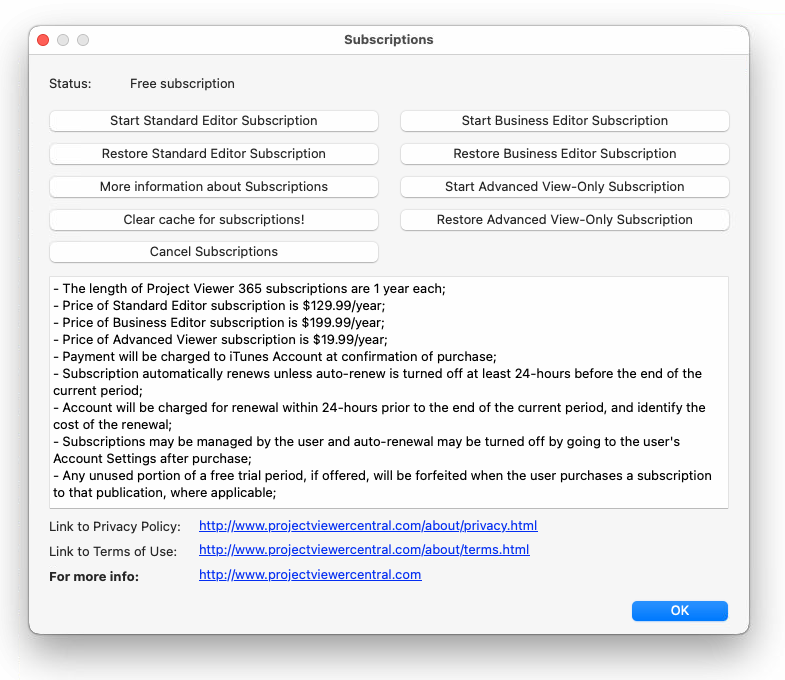
Subscriptions is available on Help menu -> Subcriptions, is used to show various subscription situations.

Use Subscriptions window to start/ restore or view your subscription status:
Product Features

New Project
 
​
 
Create New Project
 
✔
✔
Global Settings
 
 
✔
New Blank Project
✔
✔
✔
New from Existing Project
✔
✔​
✔
New from Template
✔
✔​
✔
Options dialog
✔
✔​
✔
Set Project Start Date
✔
✔​
✔
Open Project
 
​
 
Folder Explorer​
✔​
✔​
✔
Open Double Click
✔
✔​
✔
Open from Box
✔✔​
✔
Open from Dropbox
✔​✔​
✔
Open from My Projects - Drive 365
​✔​
✔
Open from Email Attachment
✔
✔​
✔
Open from Google Drive
✔
✔​
✔
Open from iCloud Drive
✔
✔​
✔​
Open from Local Device
✔
✔​
✔
Open from OneDrive
✔
✔​
✔
Open OneDrive for Business
✔
✔​
✔
Open from Project Server
✔
✔
✔
Open from Project Online
✔
✔
✔
Open from SharePoint Online
✔
✔​
✔
Open from SharePoint Task List
✔
✔​
✔​
Open from SharePoint
✔
✔
✔
Open from URL
✔
✔​
✔
Open MPP from other Web Applications
✔
​✔​
✔
Open Recent Files
✔
✔​
✔
Open Sample Project
✔
✔​
✔
Open XML
✔
✔​
✔
Save Project
 
​
 
Auto Save
 
✔​
✔
Save
 
✔​
✔
Save As
 
✔​
✔
Warning Messages on Save
 
✔​
✔​
Import/Export
 
​
 
Import from Excel or CSV
​✔​
​✔​
​✔​
Import from XML
​✔​
​✔​
​✔​
Import from Smartsheet
​✔​
​✔​
​✔​
Import from XMind
​✔​
​✔​
​✔​
Import from MindManager
​✔​
​✔​
​✔​
Export to CSV
✔
✔​
✔
Export to Dashboard
✔
✔
✔
Export to Image
✔
✔​
✔
Export to MPP
 
✔​
✔
Export to My Calendar
 
 
✔
Export to PDF
✔
✔​
✔
Export to XML
✔
✔​
✔
Agile
 
​
 
Use Agile in Project Plan 365
​​
​✔​
✔
Supported formats
 
​
 
earlier 2007
✔
✔​
✔
2010
✔
✔​
✔
2013
✔
✔​
✔
20​16
✔
✔​
✔
​Log Off
✔​
✔​
✔
Share
 
​
 
Share
 
✔
✔
Enabling MPP for Real-Time Collaboration
 
​
​✔
Tasks
 
​
 
Copy
✔
✔​
✔
Copy Paste from External Source (Excel/Csv)
✔
✔​
 
Cut
 
✔​
✔
Delete Multiple Tasks
✔
​✔
✔
Delete Task
 
✔​
✔
Find
✔
✔
✔
Hyperlink
✔
​✔
✔
Insert Multiple Tasks
✔
​✔
✔
​Insert Recurring Task
✔
✔​
✔
Insert Task
✔
✔​
✔
Link Multiple Tasks
✔
✔​
✔
Link Unlink Tasks
✔
✔​
✔
Manual Tasks
✔
✔​
✔
My Tasks
✔
✔​
✔
Null Tasks or Blank Rows
✔
✔​​
✔
Paste
✔
✔​
✔
Replace
✔
✔
​✔
Select
✔
✔
✔​
Set Milestones
✔
✔​
✔
Set Task Duration
✔
✔​
✔
Set Task Mode
✔
✔ ​
✔
Set Task Type
✔
✔​
✔
Split Task
✔
​✔
✔
Task Information
✔
✔​
✔
Task Notes
✔
✔​
✔
Task Notification
✔
✔
✔
Undo Redo
✔
✔​
✔
Team
 
​
 
Assign Resource
✔
✔​
✔
Delete Multiple Resources
✔
​✔
✔
Delete Resource
✔
✔​
✔
Enter Pay Rates for Resources
✔
✔​
✔
Insert Multiple Resources
✔
​✔
✔
Insert Resource
✔
✔​
✔
Resource Information
✔
✔​
✔
Resource Merge
 
✔​
​✔
Resource Notes
✔
✔​
✔
Resource Overallocation
✔
✔​
✔
Resource Leveling
 
​
✔
Manage Divisions
 
​
✔
Manage Team
 
✔​
✔
Set Resource Units
✔
✔​
✔
Set the Amount of Work That People Perform on Tasks
✔
✔​
✔
Summary Assignments
✔
✔​
✔
Restrict Project Editing
 
​
✔
Print
 
​
 
Page Setup
✔​
 ✔
✔
Print for Mac
✔​
✔​
✔​
Print Preview
✔
✔​
✔
Reports
 
​
 
Budget Report
✔
​✔
​✔
Burndown Report
 
 
✔
Cash Flow Report
✔
​✔
​✔
Compare
✔
​✔
✔​
Completed Tasks Report
✔
​✔
​✔
Critical Tasks Report
✔
​✔
​✔
Custom Reports
✔
✔
✔
Dashboard
✔
​✔
✔
Earned Value Report
✔
✔
✔
Milestones Report
✔
​✔
​✔
Overallocated Resources Report
✔
​✔
​✔
Overbudget Resources Report
✔
​✔
​✔
Overbudget Tasks Report
✔
​✔
​✔
Project Summary Report
✔
​✔
​✔
Resource Material Report
✔
​✔
​✔
Resource Usage Report
✔
​✔
​✔
Resource Work Report
✔
​✔
​✔
Risk Management
 
 
✔
S-Curve Report
 
 
✔
Should Have Started Tasks Report
✔
​✔
​✔
Splipping Tasks Report
✔
​✔
​✔
Statistics
✔
​✔
​✔
Task Usage Report
✔
​✔
​✔
Tasks in Progress Report
✔
​✔
​✔
Tasks Starting Soon Report
✔
​✔
​✔
Task Report
✔
​✔
​✔
To Do List Report
✔
​✔
​✔
Top Level Tasks Report
✔
​✔
​✔
Unstarted Tasks Report
✔
​✔
​✔
User Activity
✔​
✔​
✔​
Visual Reports
​
 
✔​
Who Does What Report
✔
​✔
​✔
Who Does What When Report
✔
​✔
​✔
Working Days Report
✔
​✔
​✔
Project Tracking
 
​
 
Assignments Filters
✔
✔​
✔
Autofilter
✔
​✔
 
Computed Fields
✔
✔​
✔
Costs Filters
✔
✔​
✔
Current Activities Filters
✔
✔​
✔
Custom Fields
✔
✔​
✔
Edit fields
✔
✔​
✔
Go To
✔
​✔
​✔
Group
✔​
✔​
✔​
Outline Tasks into Subtasks and Summary Tasks (Indent/Outdent)
✔
✔​
✔
Overview Filters
✔
✔​
✔
Project Fields
✔
✔​
✔​
Project Information
✔
✔​
✔
Project Server Fields
✔
✔​
✔​
Save Fields
✔
✔​
✔
Scroll To
✔
​✔
✔​
Set Status Date
✔
✔​
✔
Sort
✔
✔​
✔
Tables
✔
✔​
✔
View Outline Levels
✔
✔​
✔
Zoom
✔
✔​
✔
Scheduling
 
​
 
Master project and subprojects
 
​
​✔
Apply Constraints
✔​
✔​
✔
Deadlines
✔
✔​
✔
Baseline
✔​
✔​
✔​
Calculation Duration, Start and Finish
✔
✔​
✔
Change task scheduling options defaults for days, weeks, and months
✔
✔​
✔
Change working days
✔
✔
✔
Critical Path
✔
✔​
✔
Early Start and Early Finish fields
✔
✔​
✔
Inactive tasks
✔
✔
✔
Late Start and Late Finish fields
✔
✔​
✔
Lead and Lag times
✔
✔​
✔
Max Units
✔
✔​
✔​
Mark on Track
 
✔​
✔​
Project Plan 365 Scheduling Engine
✔
✔​
✔​
Project Tracking
✔
✔​
✔
Assignments Peak Units
✔
✔
✔
Set Start Finish date hours
✔
✔​
✔
Set the scheduling units for duration
✔
✔​
✔
Move Project
✔
✔​
✔
Slack calculation
✔
✔​
✔
Standard Time Phase data
✔
✔​
✔
Percent Complete
✔
✔​
✔
Update Project
 
✔​
✔
Update Tasks
 
✔​
✔
Calendar
 
​
 
Base Calendars
✔
✔​
✔​
Schedule Calendar
✔​
✔​
✔​
Project Calendars
✔
​✔​
✔
Set a Calendar to a Task
✔
​✔​
✔
Set Resource Calendar
✔
​✔​
​✔​
Delete Calendars
✔
✔​
 
Languages and impact on Project Plan 365 calendars
✔
✔​
✔
Format
 
​
 
Currency
✔
✔​
✔
Date Format
✔
✔​
✔
Language
✔
✔​
✔
Advanced Options
✔
✔​
✔
Properties
✔
✔​
 
Timescale
✔
✔​
✔
Gridlines
✔
✔​
✔
Bar
✔
✔​
✔​
Bar Styles
✔
​✔
✔
Font Text Style
✔
​✔
✔
Full Screen
✔
✔
 
Gantt Chart Actions
✔
​✔
 ✔
Gantt Chart Style
✔
✔​
✔
​Spell Check Mac
✔​
✔​
✔​
Insert/Hide/Move Column
✔
✔​
✔
Keyboard Shortcuts for Windows
✔​
✔​
✔​
Keyboard Shortcuts for Mac
✔​
✔​
✔​
Keyboard Shortcuts for Web
✔​
✔​
✔​
Layout
✔
✔​
✔
Move Row
✔
✔​
✔​
Scroll Bar
✔
​✔
✔​
View Bar
✔
✔​
✔
Views
 
​
 
Custom Views
✔
✔
✔
Resource Usage
✔
✔​
✔
Resource Graph
✔
✔
✔​
Assignment Information
✔
✔​
✔
Calendar View
✔
✔​
✔
Gantt Chart
✔
✔​
✔
More Views
✔
​✔
✔
Network Diagram
✔
✔​
✔
Progress Lines
✔
✔​
✔​
Resource Sheet
✔
✔​
✔
Task Sheet
✔
✔​
✔
Task Usage
✔
✔​
✔
Team Planner
✔
​✔
​✔
Timeline
✔
✔
✔​
Toolbar view name list
✔
✔
✔​
Tracking Gantt
✔
✔​
✔
Other Features
 
​
 
Erix Chatbot
✔
✔
✔
Compatibility of Project Plan 365 with Microsoft Project
✔
✔
✔
​​Close
✔​
✔​
✔
​Exit​
✔​
✔​
✔
EULA
✔
✔​
✔
Help
✔
✔​
✔
Subscription MAC Options
✔​
✔​
✔​
Online Training
✔
✔​
✔
Free Viewer
✔
✔​
✔
Siri Shortcut for Mac
✔
✔​
✔
Cost
 
​
 
Cost Resources
✔
​✔
 ✔
Cost Tracking
✔
✔​
✔
Installation
 
​
 
Download
✔
✔​
✔
About
✔
✔​
✔
Install Project Plan 365 for Mac
✔​
✔​
✔​
Silent Install/Uninstall Project Plan 365 for Mac
✔​
✔​
✔​
System Requirements
✔
✔
✔
Account
 
​
 
Sign Up to Project Plan 365
✔
✔
✔
Sign In to Project Plan 365
✔
✔
✔
Start 14-Day Standard Trial
✔
✔
✔
Start 14-Day Business Trial
✔
✔
✔
Standard/Business Roles
✔
✔
✔
Change Business Name
✔
✔
✔
Cancel Subscription
✔
✔
✔
App Store Mac - Activate Subscription
 
✔
 
Forgot Password
✔
✔
✔
Change Password
✔
✔
✔
Set Password
✔
✔
✔
View All the Projects from Drive 365
✔
✔
✔
Restore Subscription
✔
✔
✔
Registration
✔
✔
 
Sales & Billing
 
​
 
Purchase Standard Subscription
✔
✔
✔
Purchase Business Subscription
✔
✔
✔
Purchase Enterprise License
✔
✔
 
Renew Standard Subscription
✔
✔
✔
Renew Business Subscription
✔
✔
✔
CO-TERM
✔
✔
✔
App Store Mac – Start 14-Day Trial and Purchase Business Subscription
✔
✔
✔
App Store Mac – Start 14-Day Trial and Purchase Standard Subscription
✔
✔
✔
App Store Mac – Start 14-Day Trial and Purchase Business Editor Subscription for Project Viewer 365
✔
✔
✔
App Store Mac – Start 14-Day Trial and Purchase Standard Editor Subscription for Project Viewer 365
✔
✔
✔
Reseller Info
✔
✔
✔
Contact Chat